


Interacting with the backend directly#
In some advanced use cases, the EyeModel class may not be sufficient to define the desired optical system, or a certain analysis may not be available in visisipy.analysis.
In these cases, you can interact with the backend directly.
Visisipy provides a few functions to make this as easy as possible:
visisipy.get_backend: Get a reference to the currently active backend, eitherOptilandBackendorOpticStudioBackend.visisipy.get_oss: Get a reference to the currently active OpticStudio instance. This allows for direct interaction with OpticStudio, but only works if the OpticStudio backend is active.visisipy.get_optic: Get a reference to OptilandsOpticobject. This allows for direct interaction with the optical system, but only works if the Optiland backend is active.
Examples#
Note
This example uses the Optiland backend. A similar example for the OpticStudio backend can be found here.
Select the Optiland backend and get a reference to the backend object:
import visisipy

visisipy.set_backend("optiland")

model = visisipy.EyeModel()
model.build()

backend = visisipy.get_backend()

print(backend)
<visisipy.optiland.backend.OptilandBackend object at 0x7afd4cf31160>
This reference can, for example, be used to save the model to a file:
backend.save_model("example_model.json")
The Optic object can be retrieved with visisipy.get_optic.
This object can be used to interact with the optical system directly, for example, to get the surface data:
optic = visisipy.get_optic()

optic.info()
╒════╤═══════════════╤═══════════════════════╤══════════╤═════════════╤═══════════════╤═════════╤═════════════════╕
│    │ Type          │ Comment               │   Radius │   Thickness │ Material      │   Conic │   Semi-aperture │
╞════╪═══════════════╪═══════════════════════╪══════════╪═════════════╪═══════════════╪═════════╪═════════════════╡
│  0 │ Planar        │                       │   inf    │    inf      │ Air           │  0      │      1.52788    │
│  1 │ Standard      │ cornea front          │     7.72 │      0.55   │ 1.3761, 53.05 │ -0.26   │      1.52788    │
│  2 │ Standard      │ cornea back / aqueous │     6.5  │      3.05   │ 1.3375, 48.50 │  0      │      1.49804    │
│  3 │ Stop - Planar │ pupil                 │   inf    │      0      │ 1.3375, 48.50 │  0      │      1.348      │
│  4 │ Standard      │ lens front            │    10.2  │      4      │ 1.4201, 46.38 │ -3.1316 │      1.348      │
│  5 │ Standard      │ lens back / vitreous  │    -6    │     16.3203 │ 1.3361, 49.69 │ -1      │      1.13184    │
│  6 │ Standard      │ retina                │   -12    │    nan      │ 1.3361, 49.69 │  0      │      0.00046279 │
╘════╧═══════════════╧═══════════════════════╧══════════╧═════════════╧═══════════════╧═════════╧═════════════════╛
Because the Optiland backend is used, visisipy.get_oss will raise a BackendAccessError:
visisipy.get_oss()
---------------------------------------------------------------------------
BackendAccessError                        Traceback (most recent call last)
Cell In[5], line 1
----> 1 visisipy.get_oss()

File ~/checkouts/readthedocs.org/user_builds/visisipy/checkouts/latest/visisipy/backend.py:537, in get_oss()
    524 """Get the OpticStudioSystem instance from the current backend.
    525
    526 Returns
   (...)    534     If the OpticStudioBackend is not currently initialized, or if the platform is not Windows.
    535 """
    536 if platform.system() != "Windows":
--> 537     raise BackendAccessError("The OpticStudio backend is only available on Windows.")
    539 from visisipy.opticstudio import OpticStudioBackend  # noqa: PLC0415
    541 if instance := OpticStudioBackend.get_instance():

BackendAccessError: The OpticStudio backend is only available on Windows.
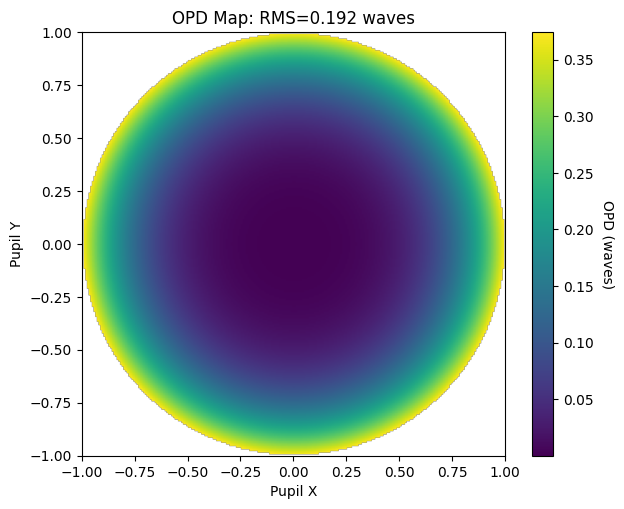
The Optic object can also be used to run additional analyses available in Optiland, such as optical path difference map:
from optiland.wavefront import OPD

OPD(optic, field=(0, 0), wavelength=0.543).view()
(<Figure size 700x550 with 2 Axes>,
 <Axes: title={'center': 'OPD Map: RMS=0.192 waves'}, xlabel='Pupil X', ylabel='Pupil Y'>)
Using multiple backends simultaneously#
It is also possible to use multiple backends simultaneously. To do this, the backend classes must be imported and initialized manually.
from visisipy.optiland import OptilandBackend
from visisipy.opticstudio import OpticStudioBackend

# Initialize the backends
optiland = OptilandBackend()
opticstudio = OpticStudioBackend()
To run an analysis using a specific backend, you can pass the backend as a keyword argument to the analysis function:
visisipy.analysis.cardinal_points(model=model, backend=opticstudio)
An extensive example of using multiple backends can be found in the Comparison between the OpticStudio and Optiland backends.