
Interacting with the backend directly#
In some advanced use cases, the EyeModel class may not be sufficient to define the desired optical system, or a certain analysis may not be available in visisipy.analysis.
In these cases, you can interact with the backend directly.
Visisipy provides a few functions to make this as easy as possible:
visisipy.get_backend: Get a reference to the currently active backend, eitherOptilandBackendorOpticStudioBackend.visisipy.get_oss: Get a reference to the currently active OpticStudio instance. This allows for direct interaction with OpticStudio, but only works if the OpticStudio backend is active.visisipy.get_optic: Get a reference to OptilandsOpticobject. This allows for direct interaction with the optical system, but only works if the Optiland backend is active.
Examples#
Note
This example uses the Optiland backend. A similar example for the OpticStudio backend can be found here.
Select the Optiland backend and get a reference to the backend object:
import visisipy

visisipy.set_backend("optiland")

model = visisipy.EyeModel()
model.build()

backend = visisipy.get_backend()

print(backend)
<class 'visisipy.optiland.backend.OptilandBackend'>
This reference can, for example, be used to save the model to a file:
backend.save_model("example_model.json")
The Optic object can be retrieved with visisipy.get_optic.
This object can be used to interact with the optical system directly, for example, to get the surface data:
optic = visisipy.get_optic()

optic.info()
╒════╤═══════════════╤═══════════════════════╤══════════╤═════════════╤═══════════════╤═════════╤═════════════════╕
│    │ Type          │ Comment               │   Radius │   Thickness │ Material      │   Conic │   Semi-aperture │
╞════╪═══════════════╪═══════════════════════╪══════════╪═════════════╪═══════════════╪═════════╪═════════════════╡
│  0 │ Planar        │                       │   inf    │    inf      │ Air           │  0      │      1.52788    │
│  1 │ Standard      │ cornea front          │     7.72 │      0.55   │ 1.3761, 53.05 │ -0.26   │      1.52788    │
│  2 │ Standard      │ cornea back / aqueous │     6.5  │      3.05   │ 1.3375, 48.50 │  0      │      1.49804    │
│  3 │ Stop - Planar │ pupil                 │   inf    │      0      │ 1.3375, 48.50 │  0      │      1.348      │
│  4 │ Standard      │ lens front            │    10.2  │      4      │ 1.4201, 46.38 │ -3.1316 │      1.348      │
│  5 │ Standard      │ lens back / vitreous  │    -6    │     16.3203 │ 1.3361, 49.69 │ -1      │      1.13184    │
│  6 │ Standard      │ retina                │   -12    │    nan      │ 1.3361, 49.69 │  0      │      0.00046279 │
╘════╧═══════════════╧═══════════════════════╧══════════╧═════════════╧═══════════════╧═════════╧═════════════════╛
Because the Optiland backend is used, visisipy.get_oss will return None.
type(visisipy.get_oss())
NoneType
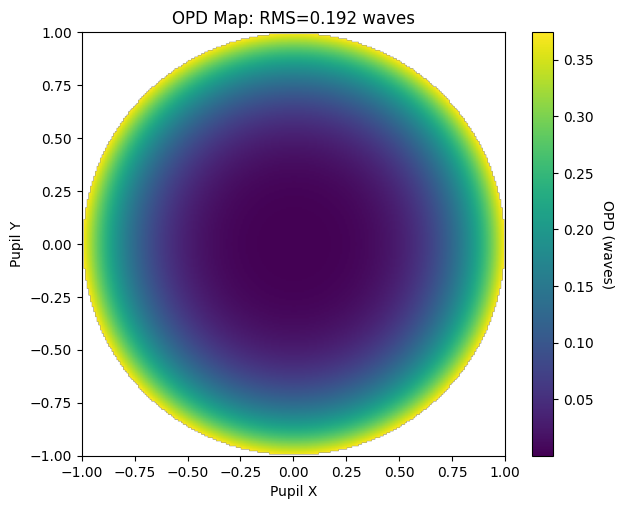
The Optic object can also be used to run additional analyses available in Optiland, such as optical path difference map:
from optiland.wavefront import OPD

OPD(optic, field=(0, 0), wavelength=0.543).view()
Using multiple backends simultaneously#
It is also possible to use multiple backends simultaneously. To do this, the backend classes must be imported and initialized manually.
from visisipy.optiland import OptilandBackend
from visisipy.opticstudio import OpticStudioBackend

# Initialize the backends
OptilandBackend.initialize()
OpticStudioBackend.initialize()
To run an analysis using a specific backend, you can pass the backend as a keyword argument to the analysis function:
visisipy.analysis.cardinal_points(model=model, backend=OpticStudioBackend)
An extensive example of using multiple backends can be found in the Comparison between the OpticStudio and Optiland backends.